
Attribution windows in Coco AI
Why attribution windows matter
Coco AI uses attribution windows to decide whether a Coco interaction (a message or an AI chat) influenced a Shopify order. Understanding these windows helps you interpret your Coco AI Revenue report and compare Coco’s results to other tools (for example, Klaviyo or Shopify reports), which may use different attribution rules and timeframes.
What an attribution window is
An attribution window is the amount of time Coco AI “looks back” after a Coco interaction to see whether a purchase happens.
- If a customer places an order within the window, Coco attributes that order’s revenue to the interaction.
- If the order happens after the window ends, Coco does not attribute that revenue to the interaction.
Attribution windows by feature
Campaigns and Automations (messages sent by Coco)
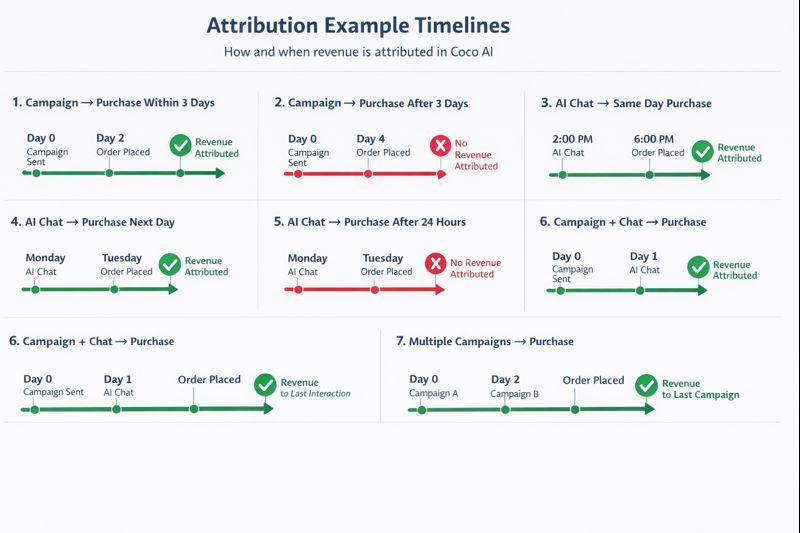
Coco uses a 3-day attribution window for messages sent through Campaigns and Automations.
- Within 3 days: order revenue is attributed to the campaign or automation that sent the message.
- After 3 days: the order is not attributed to that message.
AI Chat
Coco uses a 24-hour attribution window for AI Chat conversations.
- Within 24 hours: order revenue is attributed to the AI chat conversation.
- After 24 hours: the order is not counted as chat-attributed revenue.
This shorter window reflects how chat is typically used: to answer questions and remove friction close to checkout.
How revenue is attributed in Coco
Coco attributes revenue using last Coco interaction within the relevant attribution window.
Revenue attribution logic
- A customer receives a Coco message (Campaign/Automation) or starts an AI chat.
- Coco starts the attribution window for that interaction (3 days for messages; 24 hours for chat).
- If the customer places an order within the window, the full order revenue is attributed to Coco.
- If multiple Coco interactions happen before the order, the most recent Coco interaction within the window gets credit.
Important things to know
- No open/click extensions: Coco does not extend attribution windows based on opens or clicks. Attribution is based on message delivery or the chat interaction, not engagement.
- Independent reporting: Coco attribution is calculated independently from Shopify, Klaviyo, Meta, or other platforms. Different tools can legitimately report different attributed revenue for the same time period.
- Conservative by design: Shorter windows generally produce more conservative totals—this does not mean the traffic or conversions are lower quality.
FAQs & troubleshooting
Klaviyo commonly uses a longer default attribution window (often 7 days), while Coco uses 3 days for Campaigns/Automations and 24 hours for AI Chat. Longer windows naturally claim more revenue.
Coco reports attribution for Coco only. Other platforms may also claim credit for the same order based on their own models and windows.
No. Attribution windows are fixed in Coco to keep reporting consistent and comparable over time.
If both interactions happen within their respective windows, the most recent Coco interaction gets credit.
Attributed revenue reflects the order revenue recorded by Shopify before refunds.